











B2B website CRM integration: plan the enquiry handover
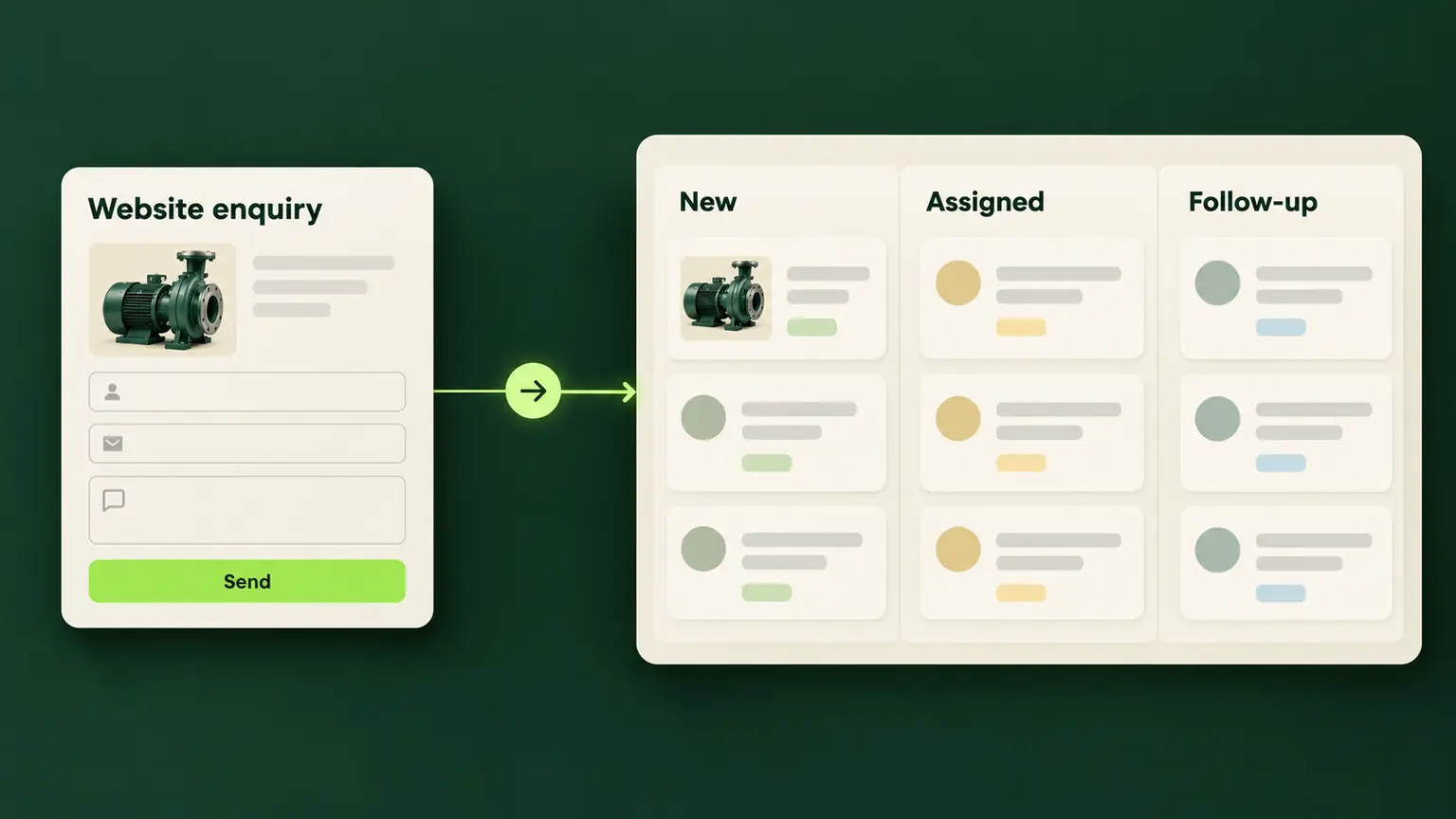
B2B website CRM integration connects website enquiries with your customer relationship management system, but the useful result is a request that the right person can find and act on. During website development, specify that handover before choosing a connector or drawing a sales dashboard.
A buyer may request a replacement component, a production quotation or a maintenance visit. These enquiries need different follow-up, even when they arrive through the same website. This guide explains what to include in the development brief; it does not assume your existing site already has a CRM connection.
Define the record your sales team needs
Decide whether a new submission creates a contact, an enquiry, a sales opportunity or a combination of linked records. A form submission is not automatically a qualified opportunity. Your team may need to check service coverage or technical suitability first.
Write one acceptance statement: “A valid request creates a traceable enquiry, preserves the buyer’s requirements and reaches a named team.” Agree what should happen when the sender already exists. Updating a contact should not overwrite an account owner or discard earlier enquiries.
Include these decisions in your industrial website development brief. For buyer-facing questions and validation, use the separate RFQ form design guide. The integration brief starts with what happens to the submitted information.
Map the information before connecting systems
Create a field map with the sales team and the person responsible for the CRM. For each value, record its source, destination, format, permitted values and treatment when missing. Distinguish an empty answer from a deliberate “not known yet”.
The following hypothetical example concerns a supplier receiving component enquiries. It illustrates mapping decisions rather than a particular CRM product.
| Website information | Intended destination | Rule to agree |
|---|---|---|
| Contact email | Contact record | Check for an existing contact without merging unrelated people |
| Product reference | Enquiry item | Preserve the stable reference alongside its readable name |
| Quantity and unit | Enquiry item | Keep the number and unit together; do not assume pieces |
| Buyer’s message | Enquiry description | Preserve meaning and line breaks within agreed limits |
| Page and selected language | Enquiry context | Retain the relevant page, without copying sensitive URL parameters |
| Submission reference | Delivery record | Use it to trace one request across the handover |
Product identifiers should come from the same records used by the website. The product catalogue website guide explains that foundation. Avoid relying only on translated product labels, which can change without the underlying item changing.
Assign responsibility and preserve the original request
Choose a routing rule your staff can explain: product family, service region or existing customer ownership, for example. Set a fallback team for requests that do not match. A record with no owner should be visible in an exception queue, not silently ignored.
Keep the original message available when staff add notes or qualify the requirement. A salesperson’s interpretation should not replace the buyer’s wording. Record the source and received time so the team can distinguish a new request from an older conversation.
If the site has several languages, pass the selected language separately from delivery country. They answer different questions. The multilingual website guide covers the website-side terminology and language structure. Do not promise a response time merely because an automated routing rule exists.
Separate acceptance, queuing and CRM delivery
A browser thank-you message is not proof that a salesperson has a usable record. Define what each stage means and which system confirms it:
- Accepted: the receiving service has validated and retained the request for processing.
- Queued: the request is waiting for delivery through an agreed, monitored process.
- Delivered: the destination confirms the intended record exists, with a reference that can be checked.
- Failed: a step could not complete and needs recovery or review.
An uncertain result also needs handling. If a connection times out after the CRM receives the request, the sender may not know whether delivery succeeded. Avoid displaying “delivered” based only on elapsed time. Equally, do not ask the buyer to repeat a request that is safely retained and awaiting processing.
Prevent duplicates and make failures recoverable
Repeated POST requests can create duplicate records; they are not inherently idempotent. MDN explains this behaviour.
Ask the development team how one submission is identified across retries. A repeated delivery of that submission should resolve to its existing result, while a genuinely new enquiry from the same email must remain separate. Matching only the email address is insufficient: one buyer can have several purchasing requirements.
Agree bounded retries, waiting intervals and a review path for unresolved failures. Invalid field values require correction rather than endless resending. Record enough diagnostic detail to identify the failed stage and submission reference without putting complete buyer messages into routine technical logs.
Nominate who checks the exception queue and who can replay a request. Include recovery work and connector maintenance when comparing the cost of developing a manufacturing website.
Limit access and keep credentials off the website
Private CRM credentials belong in an approved server-side or managed integration environment, not in page source, downloaded JavaScript or public content records. Give the connection only the access required for its agreed actions. Creating an enquiry does not automatically require permission to export the entire customer database.
Decide which data is necessary, where it is retained, who can access it and how long it is kept. If drawings are involved, define a controlled file workflow separately; an ordinary public media library is not a private enquiry store. Align the site’s privacy information with the actual process and have the responsible person approve it.
Test the complete handover before launch
Use synthetic contact details and sample requirements in an authorised test environment. Verify the destination records, not only the screen shown to the visitor.
| Test | Evidence of a correct result |
|---|---|
| New valid enquiry | Correct fields, source, owner and traceable record reference |
| Existing contact, new requirement | Contact matched appropriately; new enquiry remains distinct |
| Same submission delivered twice | One intended enquiry, with a consistent delivery reference |
| Temporary destination outage | Request retained or clearly rejected; recovery follows the agreed process |
| Invalid destination field | Visible failure for the responsible team; no false success claim |
| Different language and quantity unit | Original meaning, language and unit preserved |
At handover, obtain the field map, routing rules, status definitions, access owner and recovery instructions. Record who maintains the connection when either system changes. To discuss your website requirements, bring the current enquiry workflow and the CRM records your team expects to receive.


Price your
website.
Compare website sizes and optional catalogue, content and SEO work in the website cost calculator.
Your website price Back to the blog